UI Challenge with Web Platform
Web Experience
- Fundamentally a call & response between you & your users
- Invest in Quality Web Experiences & Interactions
- Easy to built with Native Web Platform
- No Third Party Scripting for Optimal Performance
Setting up the Stage
                1
                2
                .
                .
                .
                .
1
2
.
.
5
.
.
            body {
              background: white;
              padding: 2rem;
            }
            body {
              background: white;
              padding: 2rem;
            }
            main {
              display: flex;
              flex-direction: column;
              justify-content: space-between;
            }
            body { }
            main { }

            .calendar {
              display: grid;
              width: 400px;
              height: 500px;

            }
            body { }
            main { }

            .calendar {
              display: grid;
              width: 400px;
              height: 500px;

              grid-template-columns: repeat(7, 1fr);
              grid-template-rows: repeat(6, 1fr);
              gap: 0.25rem;
            }
            .calendar { }
            .action-footer {
              display: flex;
              justify-content: space-between;
            }
            .action-footer {
              display: flex;
              justify-content: space-between;

              input[type="text"] {
                border-radius: 2rem;
                padding: 0.75rem;
                border: 1px solid #ccc;
              }
            }
            .action-footer {
              display: flex;
              justify-content: space-between;

              input[type="text"] {
                /* .... */
              }

              svg {
                border: 1px solid #ccc;
                border-radius: 50%;
                /* .... */
              }
            }
Three Distinct Features
- Event Details
- Slide throught Events
- Smooth Transition between different State
Dialog for Event Details
<dialog>
Dialog let us create modal dialogs with inert background
and a :backdrop
#top-layer
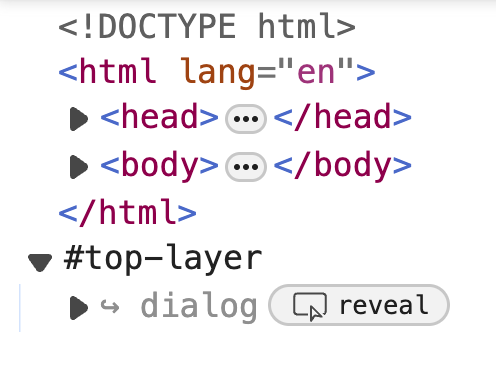
No more fighting with z-index to ensure they go on top of everything else
Inert
With the inert attribute applied, click events are not fired, the element can't gain focus, the element and content is hidden from the accessibility tree.
const eventEls = document.querySelectorAll(".event");
            const eventEls = document.querySelectorAll(".event");

            eventEls.forEach((event) => {
            });
            const eventEls = document.querySelectorAll(".event");

            eventEls.forEach((event) => {

              event.addEventListener("click", (e) => {
                dialog.showModal();
              });

            });
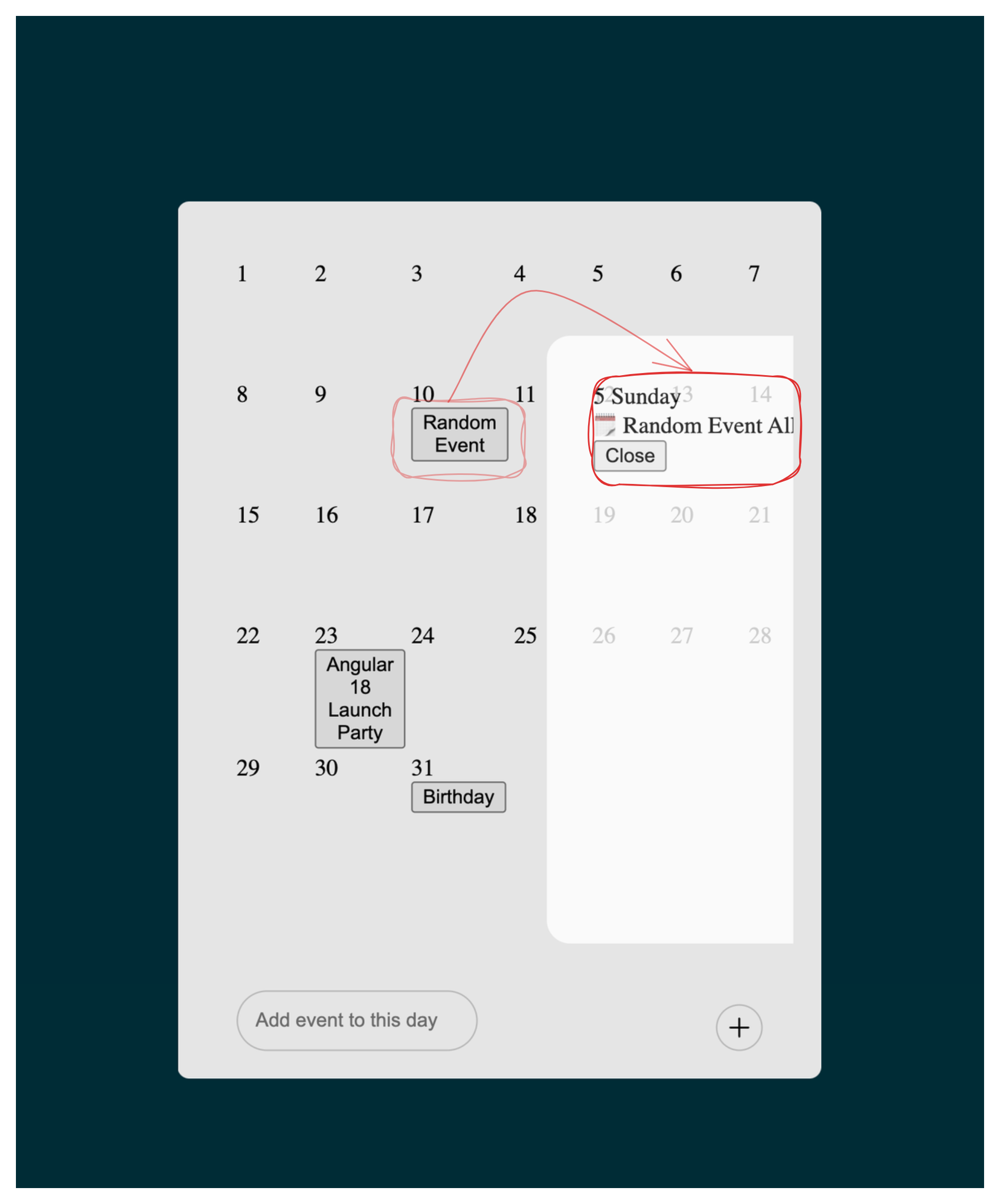
                    5 Sunday
                    🗓️ Random Event All day
            .calendar { }
            .action-footer { }

            dialog {

            }
            .calendar { }
            .action-footer { }

            dialog {
              width: 100%;
              border: none;
              background-color: transparent;
              padding: 0;
            }
            dialog {
              width: 100%;
              border: none;
              background-color: transparent;
              padding: 0;

              section {
                width: 100%;
                display: flex;
                flex-wrap: nowrap;
                align-items: center;
                overflow-y: hidden;
              }
            }
            dialog {
              /* .... */

              section {
                width: 100%;
                display: flex;
                flex-wrap: nowrap;
                align-items: center;
                overflow-y: hidden;
              }

              article {
              }
            }
            dialog {
              /* .... */

              section { }

              article {
                flex: none;
                height: 80vh;
                width: 80%;
                padding: 1rem;
              }

            }
Three Distinct Features
- Event Details
- Slide throught Events
- Smooth Transition between different State
Three Distinct Features
- Event Details
- Slide throught Events
- Smooth Transition between different State
SCROLL SNAP
Syntax
            /* for the scroll container */
            scroll-snap-type: y proximity;
            scroll-snap-type: x mandatory;
Syntax
            /* for the scroll container */
            scroll-snap-type: y mandatory;
            scroll-snap-type: x mandatory;

            /* for the scroll items */
            scroll-snap-align: start;
            scroll-snap-align: center;
            scroll-snap-align: end;
            dialog {
              /* .... */

              section {
                /* .... */
                overflow-y: hidden;

                scroll-snap-type: x mandatory;
              }

              article {
              }
            }
            dialog {
              /* .... */

              section {
                /* .... */
                overflow-y: hidden;

                scroll-snap-type: x mandatory;
              }

              article {
                /* .... */
                scroll-snap-align: center;
              }
            }
CSS-SCROLL-SNAP-2
Working Draft
snapChanging
snapChanged
:snapped
            const eventEls = document.querySelectorAll(".event");

            eventEls.forEach((event) => {

              event.addEventListener("click", (e) => {
                dialog.showModal();
              });

            });
            const eventEls = document.querySelectorAll(".event");

            eventEls.forEach((event) => {

            });
            const eventEls = document.querySelectorAll(".event");

            eventEls.forEach((event) => {

            });

            const sectionEl = document.querySelector("dialog section");
            /* ... */
            const sectionEl = dialog.querySelector("section");
            const articlEls = section.querySelectorAll("article");
            /* ... */
            const sectionEl = dialog.querySelector("section");
            const articlEls = section.querySelectorAll("article");

            sectionEl.addEventListener('snapchanged', e => {
            })
            const sectionEl = dialog.querySelector("section");
            const articlEls = section.querySelectorAll("article");

            sectionEl.addEventListener('snapchanged', e => {

              e.snapTargetInline.classList.add('active')

            })
            const sectionEl = dialog.querySelector("section");
            const articlEls = section.querySelectorAll("article");

            sectionEl.addEventListener('snapchanged', e => {

              articlEls.forEach(a => a.classList.remove('active'))

              e.snapTargetInline.classList.add('active')

            })
            article {
              flex: none;
              height: 80vh;
              width: 80%;
              padding: 1rem;
            }
            article {
              flex: none;
              height: 80vh;
              width: 80%;
              padding: 1rem;

              opacity: 0.8;
            }
            article {
              /* ... */

              opacity: 0.8;

            }
            article {
              /* ... */

              opacity: 0.8;
              transition: all 0.5s ease-in-out;

            }
            article {
              /* ... */

              opacity: 0.8;
              transition: all 0.5s ease-in-out;

              &.active {
                opacity: 1;
              }
            }
Three Distinct Features
- Event Details
- Slide throught Events
- Smooth Transition between different State
Three Distinct Features
- Event Details
- Slide throught Events
- Smooth Transition between different State
View Transition API
View Transition API
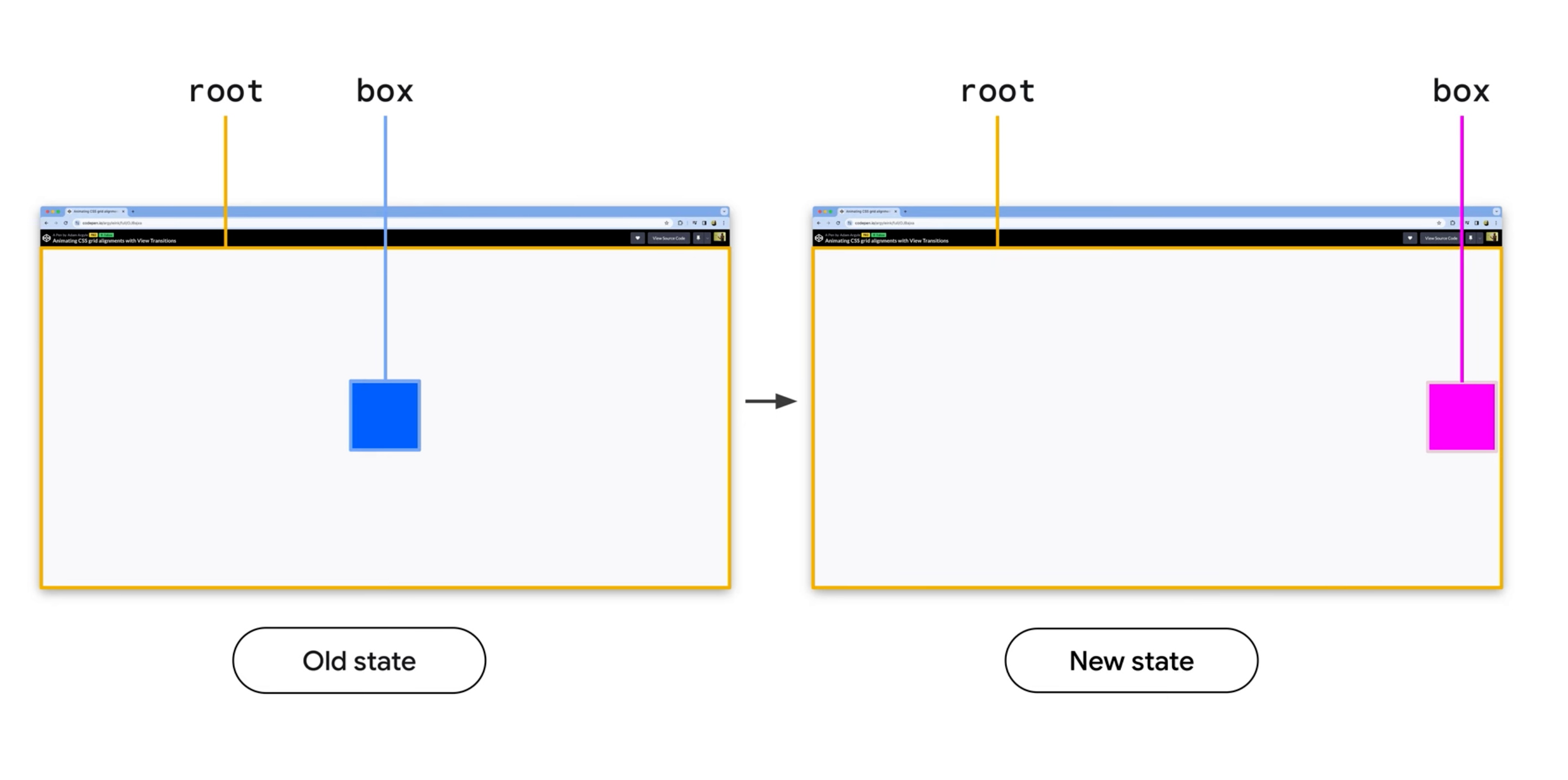
With View Transitions you can create powerful, immersive native like experiences, that have seamless transition between view of the web app.
Single Page VT
More Examples
One line to trigger View Transition
One line to trigger View Transition
document.startViewTransition(...)
            :root {
              view-transition-name: root;
            }

            .root {
              view-transition-name: root;
            }
            eventEls.forEach((event) => {

              event.addEventListener("click", (e) => {
                dialog.showModal();
              });

            });
            eventEls.forEach((event) => {

              event.addEventListener("click", (e) => {

                  dialog.showModal();

              });

            });
            eventEls.forEach((event) => {

              event.addEventListener("click", (e) => {
                document.startViewTransition(() => {

                  dialog.showModal();

                })
              });

            });
              event.addEventListener("click", (e) => {
                document.startViewTransition(() => {

                  dialog.showModal();

                })
              });
              event.addEventListener("click", (e) => {
                const eventStyle = e.target.style

                document.startViewTransition(() => {

                  dialog.showModal();

                })
              });
              event.addEventListener("click", (e) => {
                const eventStyle = e.target.style
                eventStyle.viewTransitionName = 'Event'


                document.startViewTransition(() => {

                  dialog.showModal();

                })
              });
              event.addEventListener("click", (e) => {
                const eventStyle = e.target.style
                eventStyle.viewTransitionName = 'Event'


                document.startViewTransition(() => {
                  eventStyle.viewTransitionName = null

                  dialog.showModal();

                })
              });
              event.addEventListener("click", (e) => {
                const eventStyle = e.target.style
                eventStyle.viewTransitionName = 'Event'


                document.startViewTransition(() => {
                  eventStyle.viewTransitionName = null

                  dialog.style.viewTransitionName = 'Event'

                  dialog.showModal();

                })
              });
const closeEl = document.querySelector(".close");
            const closeEl = document.querySelector(".close");

            closeEl.addEventListener("click", () => {

            });
            const closeEl = document.querySelector(".close");

            closeEl.addEventListener("click", () => {

              document.startViewTransition(() => {

              });

            });
            const closeEl = document.querySelector(".close");

            closeEl.addEventListener("click", () => {

              document.startViewTransition(() => {

                eventEl.style.viewTransitionName = 'Event'

              });

            });
            const closeEl = document.querySelector(".close");

            closeEl.addEventListener("click", () => {

              document.startViewTransition(() => {

                eventEl.style.viewTransitionName = 'Event'

                dialog.close()

              });

            });
            const closeEl = document.querySelector(".close");

            closeEl.addEventListener("click", () => {

              const transition = document.startViewTransition(() => {

                eventEl.style.viewTransitionName = 'Event'

                dialog.close()

              });

            });
            closeEl.addEventListener("click", async () => {

              const transition = document.startViewTransition(() => {

                eventEl.style.viewTransitionName = 'Event'

                dialog.close()

              });

              await transition.finished;

            });
            closeEl.addEventListener("click", () => {

              const transition = document.startViewTransition(() => {

                eventEl.style.viewTransitionName = 'Event'

                dialog.close()

              });

              await transition.finished;

              dialog.style.viewTransitionName = "";

            });
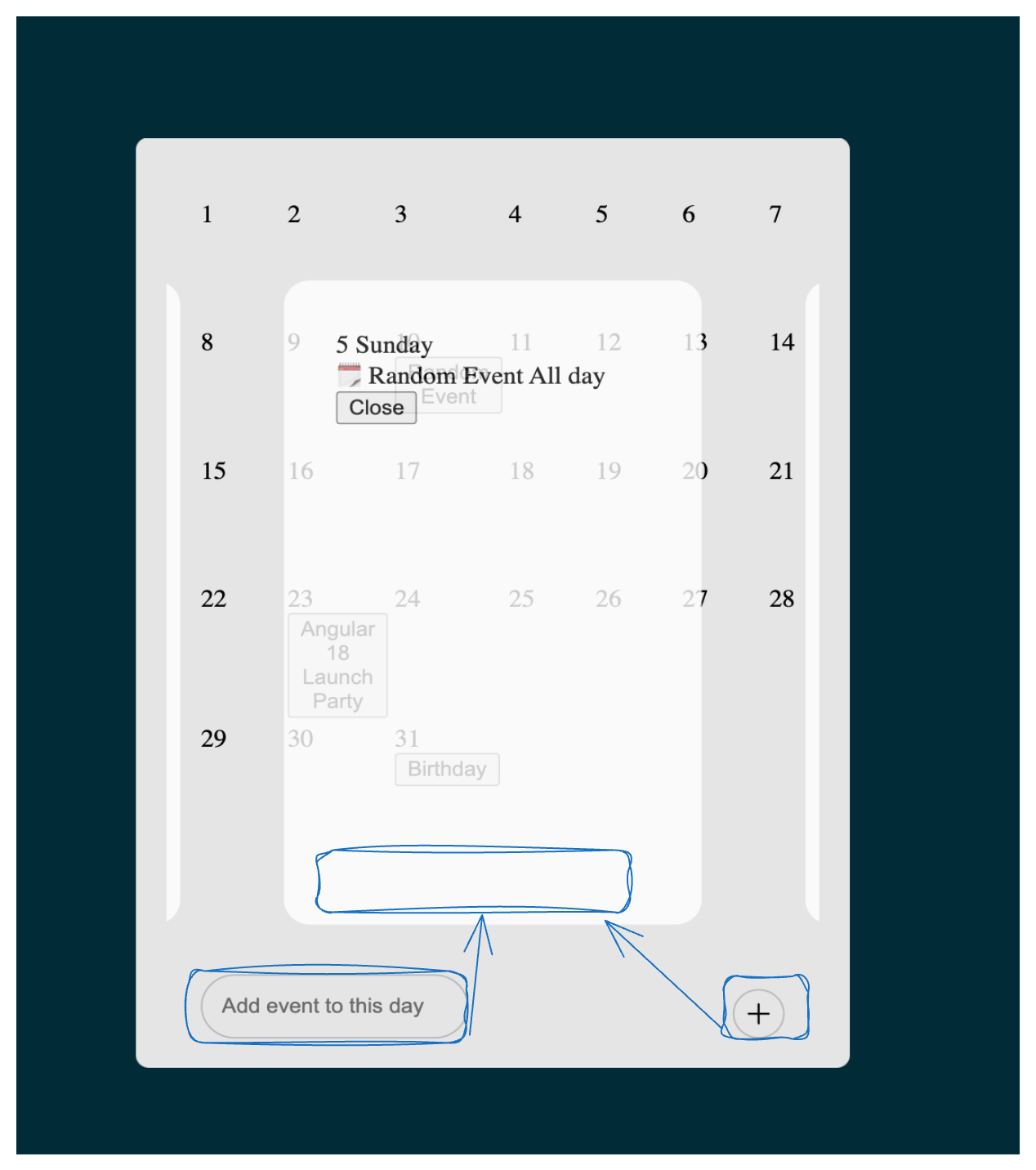
            .action-footer {
              /* .... */

            }
            .action-footer {
              /* .... */

              view-transition-name: actions;
            }
            sectionEl.addEventListener('snapchanged', e => {

              articlEl.forEach(article => article.classList.remove('active'))
              e.snapTargetInline.classList.add('active')


            })
            sectionEl.addEventListener('snapchanged', e => {

              articlEl.forEach(article => article.classList.remove('active'))
              e.snapTargetInline.classList.add('active')

              e.querySelector("footer").appendChild(actionFooter);

            })
Three Distinct Features
- Event Details
- Slide throught Events
- Smooth Transition between different State
Three Distinct Features
- Event Details
- Slide throught Events
- Smooth Transition between different State
THANK YOU
VERY MUCH
There is More
- Scroll Drive Animations
- Container Queries
- Popover
- Subgrid